SMS Opt-In Proof of Consent
This page documents the SMS opt-in flow used by ThouShaltNotClick for two-factor authentication. It is provided to Twilio as proof of consent collection in our toll-free messaging verification.
⚠️ SMS verification is optional and is NOT required to use ThouShaltNotClick
Users can fully use ThouShaltNotClick without ever providing a phone number. SMS verification is one of multiple optional security methods users can choose from, alongside TOTP authenticator apps (Google Authenticator, Authy, Microsoft Authenticator, etc.). Many users use only TOTP and never opt into SMS. Users who do not opt in to SMS retain full access to all platform functionality including login, password manager, training, and reporting.
Step 1 — Consent form, initial state
When a user clicks “Set up” on the SMS option in their /dashboard/security page, this modal opens. The consent checkbox is unchecked by default and the “Send code” button is disabled. The user must enter a phone number AND tick the checkbox before they can proceed.
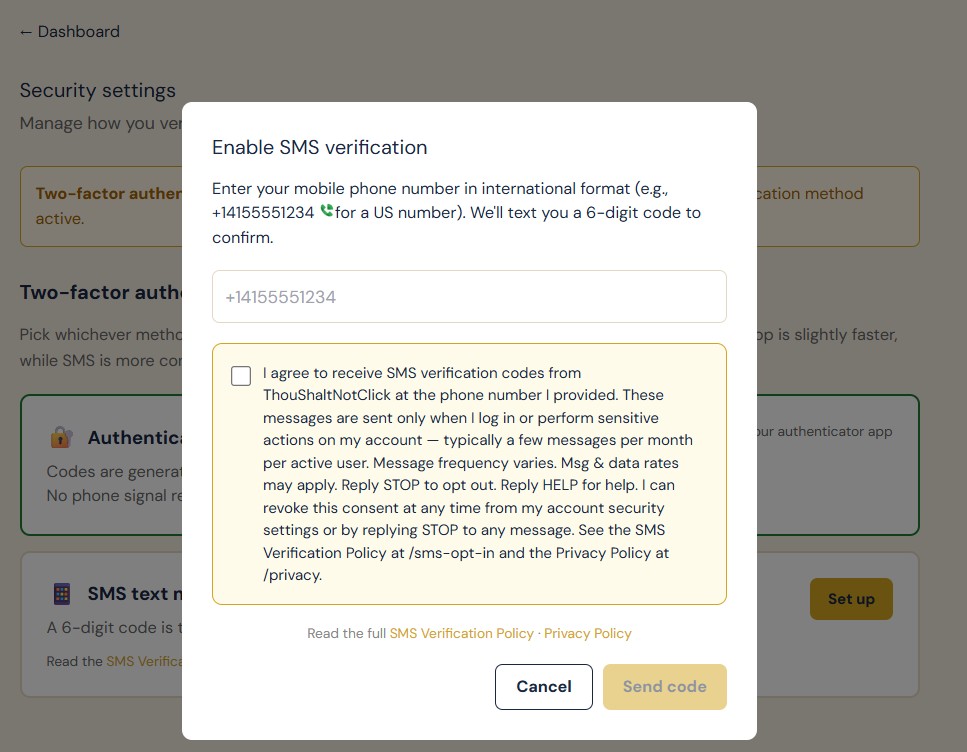
Screenshot of the live /dashboard/security SMS enrollment modal. Note the disabled Send code button (grayed) and unchecked checkbox.
Step 2 — After explicit user action
Only after the user has typed their phone number AND deliberately ticked the consent checkbox does the “Send code” button become active. Both actions are required — neither alone enables submission.
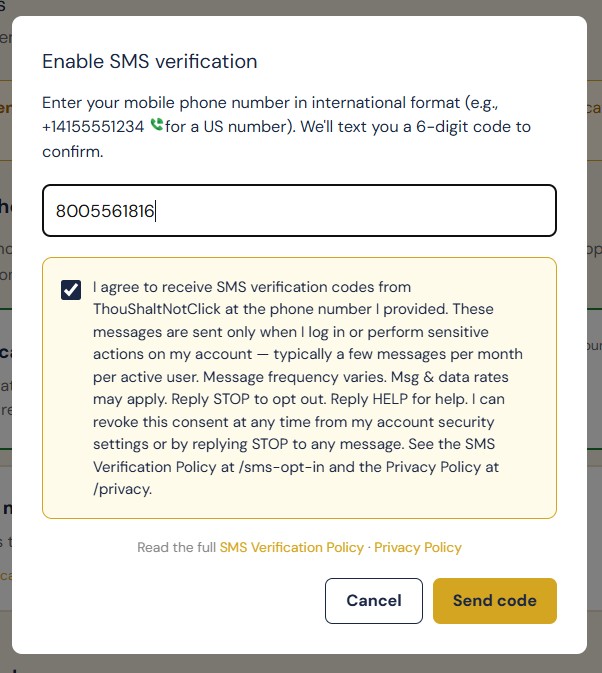
Same modal after both required user actions. The Send code button activates only when both conditions are met. The frontend gate is also re-enforced server-side.
Canonical Consent Text
Verbatim text rendered next to the checkbox in the modal above. Stored consent records include a version identifier so the exact text the user agreed to is reproducible if challenged.
Version: tsnc-sms-consent-v1-2026-05-05
Compliance Summary
- ✓Standalone consent. The consent checkbox is its own action, not bundled with any other agreement, button, or workflow step.
- ✓Unchecked by default. The user must affirmatively tick the box. Pre-checked consent is never used.
- ✓Optional, not required. SMS opt-in is never a precondition for using ThouShaltNotClick. TOTP authenticator apps are an alternative method, and users can also use the platform with no MFA configured at all.
- ✓Transactional only. ThouShaltNotClick sends SMS solely for 6-digit verification codes during login and sensitive actions. No marketing, promotional, or bulk messages are ever sent. Each message is triggered by an explicit user action.
- ✓Frequency disclosed. Message frequency (typically a few per month per active user, varies by usage) is shown to the user before consent.
- ✓Rates disclosed. “Msg & data rates may apply” is shown before consent and on every message footer.
- ✓STOP / HELP supported. Inbound STOP, STOPALL, UNSUBSCRIBE, CANCEL, END, QUIT keywords revoke consent immediately via signed Twilio webhook. HELP and INFO return assistance text. Every outbound message includes “Reply STOP to opt out, HELP for help.”
- ✓Revocation always available. Users can opt out by (a) replying STOP to any message, or (b) disabling SMS verification from their Security Settings page. Both methods immediately stamp sms_consent_revoked_at on the user record and clear the stored phone number.
- ✓Records of consent. Each opt-in is recorded with timestamp, IP address, browser user agent, and consent-text version. The exact text shown at consent time is reproducible from the version key.
Sample Message
Verbatim text of every verification SMS sent. The STOP/HELP footer appears on every message without exception.
Related Policies
- SMS Verification Policy — full program description, frequency, opt-out instructions
- Privacy Policy — how phone numbers are stored, used, and deleted
- Terms of Service — general platform terms
Compliance contact: support@thoushaltnotclick.com